← 가이드 목록← All guides

타임블로킹 완벽 가이드 / Time Blocking

할 일 목록만으로는 하루가 잘 굴러가지 않습니다. 타임블로킹은 "무엇을"에 "언제·얼마나"를 붙여, 하루를 실제로 움직이게 만드는 방법입니다.

타임블로킹이란 무엇인가

타임블로킹(Time Blocking)은 하루를 여러 개의 시간 "블록"으로 나누고, 각 블록에 미리 정해 둔 한 가지 일을 배치하는 계획 방식입니다. "오전 9시부터 11시까지는 보고서 작성", "오후 2시부터 2시 30분까지는 메일 회신"처럼, 할 일에 시작 시각과 지속 시간을 못 박아 두는 것이 핵심입니다. 캘린더에 회의 일정을 잡듯이, 나 자신과의 약속도 똑같이 잡아 두는 셈입니다.

많은 사람이 하루를 할 일 목록(To-do list)으로 관리합니다. 목록은 "무엇을 해야 하는가"는 알려주지만, "언제 그리고 얼마나 오래 할 것인가"는 침묵합니다. 그래서 목록이 길어질수록 우리는 가장 급해 보이거나 가장 만만한 일부터 손을 대고, 정작 중요한 일은 하루 끝까지 밀립니다. 타임블로킹은 여기에 시간이라는 좌표를 더해, 목록을 실행 가능한 하루의 지도로 바꿉니다.

할 일 목록은 "해야 할 일의 재고 목록"이고, 타임블로킹은 "그 재고를 언제 소비할지 정한 일정표"입니다. 둘은 경쟁 관계가 아니라 짝을 이룹니다.

할 일 목록보다 나은 이유

타임블로킹이 단순 목록보다 강한 데에는 분명한 이유가 있습니다. 첫째, 시간의 유한함을 눈으로 확인하게 됩니다. 하루는 24칸뿐이고, 그중 잠과 식사, 이동을 빼면 실제로 쓸 수 있는 블록은 생각보다 적습니다. 블록으로 그려 보면 "오늘 이걸 다 하겠다"는 계획이 애초에 물리적으로 불가능했음을 바로 알게 됩니다.

둘째, 결정 피로가 줄어듭니다. 다음에 뭘 할지 매번 목록을 훑으며 고르는 대신, 블록이 이미 "지금은 이 일"이라고 말해 줍니다. 셋째, 한 번에 한 가지에 집중하기 쉬워집니다. 블록 안에서는 그 일만 하기로 약속했으므로, 다른 알림과 유혹을 미룰 명분이 생깁니다. 이런 몰입 시간을 확보하는 구체적 방법은 집중 시간 확보하기 가이드에서 더 자세히 다룹니다.

실전 5단계

타임블로킹은 다음 다섯 단계로 진행하면 처음이라도 무리 없이 시작할 수 있습니다.

  1. 브레인덤프(쏟아내기): 머릿속에 있는 할 일을 종이든 앱이든 한곳에 전부 적습니다. 큰 일, 작은 일, 개인 일까지 가리지 않고 꺼냅니다. 이 단계의 목표는 정리가 아니라 누락 방지입니다.
  2. 소요 시간 추정: 각 항목 옆에 예상 소요 시간을 적습니다. "보고서 초안 90분", "메일 30분"처럼 구체적으로 씁니다. 추정이 어렵다면 평소보다 넉넉하게 잡으세요. 사람은 대부분 자기 작업 시간을 과소평가합니다.
  3. 블록 배치: 추정한 일들을 하루 시간표 위에 놓습니다. 이때 에너지가 높은 시간대에 가장 어려운 일을 배치하는 것이 핵심입니다. 대개 오전이 집중에 유리하므로, 아침에는 깊은 사고가 필요한 일을, 오후 늦게는 단순 업무를 배치합니다.
  4. 버퍼 추가: 블록과 블록 사이에 10~15분씩 빈 시간을 넣습니다. 회의가 길어지거나 급한 일이 끼어들 때 이 완충 시간이 하루 전체가 무너지는 것을 막아 줍니다.
  5. 하루 마무리 검토: 저녁에 실제로 어떻게 흘러갔는지 되돌아봅니다. 무엇이 예상보다 오래 걸렸는지, 어떤 블록이 지켜지지 않았는지 확인하고 내일 계획에 반영합니다.

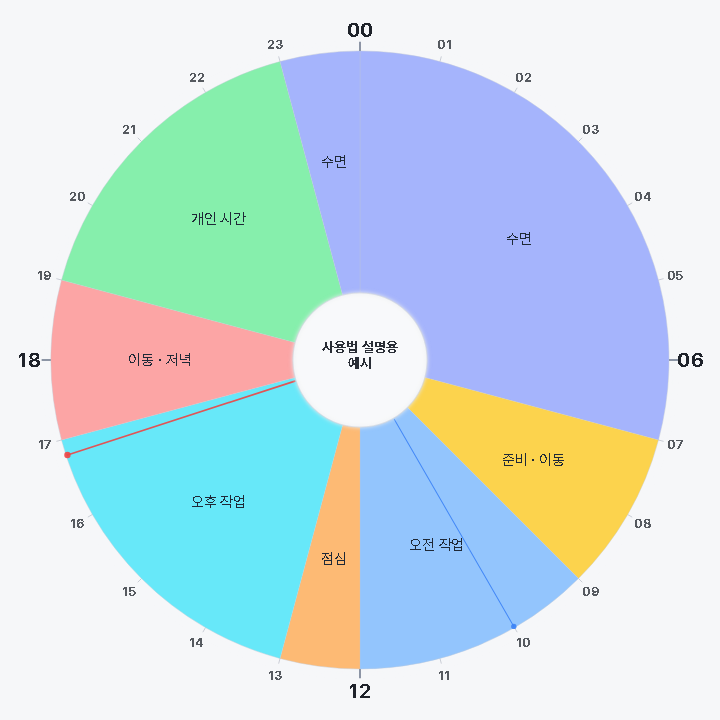
이 다섯 단계를 원형 24시간 시간표 위에 그려 보면 하루의 균형이 한눈에 들어옵니다. 24Houring 같은 원형 플래너는 잠·집중·휴식·이동이 원 위에서 어떤 비율을 차지하는지 직관적으로 보여 줘서, 블록이 한쪽에 몰려 있는지 금방 알아챌 수 있습니다.

처음이라면 이렇게 시작하세요

다섯 단계를 완벽하게 지키려다 지쳐 포기하는 경우가 많습니다. 처음에는 하루 전체를 블록으로 채우려 하지 말고, 가장 중요한 딥워크 블록 딱 하나만 정해 지켜 보세요. 오전 중 두 시간을 "이 시간에는 오직 이 일만"으로 못 박고 알림을 끄는 것만으로도 하루의 밀도가 확연히 달라집니다. 그 한 블록이 안정적으로 자리를 잡으면, 점심 이후에 두 번째 블록을 더하고, 그다음에 얕은 업무 블록을 묶는 식으로 범위를 넓혀 갑니다.

계획을 세우는 시점도 중요합니다. 아침에 허둥지둥 짜기보다, 전날 저녁 퇴근 직전 5분이나 하루를 마무리할 때 다음 날 블록을 미리 그려 두는 편이 훨씬 낫습니다. 밤사이 머리가 정리되어, 아침에는 고민 없이 첫 블록으로 바로 진입할 수 있습니다.

블록의 종류

모든 블록이 같은 성격은 아닙니다. 성격이 다른 블록을 구분해 두면 하루의 리듬을 설계하기가 훨씬 쉬워집니다.

  • 딥워크 블록: 방해 없이 한 가지 어려운 일에만 몰입하는 시간입니다. 보통 60~120분이 적당하며, 알림을 꺼 두는 것이 원칙입니다.
  • 얕은 업무·행정 블록: 메일, 회신, 결재, 잡무처럼 머리를 크게 쓰지 않는 일을 한데 모아 처리하는 시간입니다. 흩어진 잡무를 몰아서 하면 전환 비용이 줄어듭니다.
  • 휴식 블록: 점심, 산책, 낮잠, 커피처럼 회복을 위한 시간입니다. 휴식도 일정표에 명시적으로 넣어야 죄책감 없이 쉬게 됩니다.
  • 버퍼 블록: 아무 계획도 넣지 않은 여유 시간입니다. 지연을 흡수하고 돌발 상황에 대응하는 안전망 역할을 합니다.
  • 테마 요일: 하루 단위가 아니라 요일 단위로 성격을 정하는 방식입니다. 예컨대 월요일은 기획, 화·수요일은 실행, 금요일은 정리와 회고에 배정하면 주 단위 흐름이 안정됩니다.

샘플 하루 일정

지식 노동을 하는 사람의 평범한 하루를 블록으로 그리면 다음과 같은 모습이 됩니다.

  • 07:00–08:00 기상·아침 루틴(스트레칭, 식사)
  • 08:00–09:00 이동 및 하루 계획 확인
  • 09:00–11:00 딥워크 — 가장 중요한 일(오늘의 최우선 과제)
  • 11:00–11:15 버퍼·휴식
  • 11:15–12:00 얕은 업무 — 메일·메신저 회신 묶음 처리
  • 12:00–13:00 점심·산책
  • 13:00–14:30 딥워크 — 두 번째 집중 과제
  • 14:30–15:00 회의
  • 15:00–15:20 버퍼(회의 정리·다음 준비)
  • 15:20–16:30 얕은 업무·협업(리뷰, 피드백, 문서 정리)
  • 16:30–17:00 하루 마무리 검토·내일 계획
  • 17:00 이후 퇴근·개인 시간

이 일정에서 눈여겨볼 점은 딥워크가 하루에 두 번뿐이고, 그 사이사이에 버퍼가 촘촘히 박혀 있다는 것입니다. 집중은 무한정 이어지지 않으므로, 몰입 블록을 하루 두세 번으로 제한하고 나머지는 회복과 잡무로 채우는 편이 오히려 성과가 좋습니다.

방해와 초과에 대처하기

계획은 반드시 어긋납니다. 중요한 것은 어긋났을 때의 대응 규칙을 미리 정해 두는 것입니다.

급한 연락이나 갑작스러운 요청이 끼어들면, 즉시 반응하지 말고 "지금 처리할 일인가, 다음 얕은 업무 블록으로 미룰 일인가"를 한 박자 판단하세요. 대부분의 요청은 30분 뒤에 처리해도 아무 문제가 없습니다. 정말 급한 것만 현재 블록을 중단하고 대응하되, 끝나면 원래 블록으로 돌아옵니다.

블록이 예상보다 오래 걸릴 때는 두 가지 선택지가 있습니다. 버퍼를 소진해 계속하거나, 정해진 시각에 일단 멈추고 다음 블록으로 넘어가는 것입니다. 완벽주의에 빠지지 않으려면 후자를 기본값으로 삼는 편이 좋습니다. "여기까지"라는 경계가 오히려 집중을 만들어 냅니다. 남은 부분은 다음 블록이나 다음 날로 넘기면 됩니다.

계획이 절반쯤 무너진 날에도 하루 전체를 포기하지 마세요. 오전이 통째로 날아갔다면, 남은 오후 시간만 다시 블록으로 재편성하면 됩니다. 타임블로킹은 완벽한 하루를 만드는 도구가 아니라, 어긋난 순간에 빠르게 방향을 다시 잡게 해 주는 도구입니다. 지키지 못한 블록에 죄책감을 느끼기보다, "지금 이 순간부터 남은 시간을 어떻게 쓸까"로 질문을 바꾸는 태도가 오래 지속하는 비결입니다.

흔한 실수

타임블로킹을 시작한 사람들이 자주 빠지는 함정이 몇 가지 있습니다.

  • 과밀 편성: 하루를 빈틈 없이 채우는 것은 실패의 지름길입니다. 실제로 계획을 채울 수 있는 시간은 근무 시간의 60~70% 정도라고 생각하고, 나머지는 비워 두세요.
  • 버퍼 부재: 블록을 등 붙여 놓으면 하나만 밀려도 도미노처럼 무너집니다. 버퍼는 사치가 아니라 필수 구조물입니다.
  • 에너지 리듬 무시: 오후 3시의 나른한 시간에 가장 어려운 일을 배치하면 능률이 나지 않습니다. 자신의 집중 곡선을 관찰해 어려운 일을 고에너지 시간대에 배치하세요.
  • 추정 낙관: "이건 30분이면 되겠지"가 실제로는 한 시간이 되는 경우가 흔합니다. 추정에 1.5배를 곱하는 습관을 들이면 계획이 훨씬 현실적이 됩니다.

하루 마무리 검토법

타임블로킹의 진짜 힘은 반복에서 나옵니다. 하루가 끝나면 5분만 투자해 세 가지를 확인하세요. 첫째, 계획한 블록 중 실제로 지켜진 것은 몇 개인가. 둘째, 어긋난 블록은 왜 어긋났는가(추정 오류인가, 방해인가, 미루기인가). 셋째, 내일은 무엇을 바꿀 것인가.

이 짧은 회고를 며칠만 쌓아도 자신의 작업 속도와 집중 패턴에 대한 데이터가 생깁니다. 그러면 추정이 점점 정확해지고, 계획과 실제의 간격이 줄어듭니다. 하루 계획을 처음부터 다시 잡는 기본기가 흔들린다면 하루 계획의 기본을 함께 읽어 보길 권합니다.

검토를 단순한 반성으로 끝내지 말고, 반드시 내일의 계획으로 연결하세요. 예를 들어 "보고서 작성이 예상 90분에서 실제 150분이 걸렸다"는 사실을 확인했다면, 내일부터는 그 유형의 작업에 두 시간을 배정합니다. 방해가 특정 시간대에 몰린다면 그 시간에는 딥워크 대신 얕은 업무 블록을 놓습니다. 이렇게 어제의 데이터가 오늘의 배치를 바꾸는 순환이 자리를 잡으면, 타임블로킹은 단순한 일정 관리 기법을 넘어 자기 리듬을 이해하는 도구가 됩니다. 원형 시간표에 며칠 치를 겹쳐 보면 반복되는 패턴이 더 뚜렷하게 드러나, 무엇을 고정하고 무엇을 유연하게 둘지 판단하기가 쉬워집니다.

핵심 요약

  • 타임블로킹은 할 일에 "언제·얼마나"를 붙여, 목록을 실행 가능한 하루의 지도로 바꾸는 방법이다.
  • 실전 순서는 브레인덤프 → 소요 시간 추정 → 블록 배치 → 버퍼 추가 → 하루 마무리 검토의 5단계다.
  • 블록은 딥워크·얕은 업무·휴식·버퍼·테마 요일로 구분하면 하루 리듬을 설계하기 쉽다.
  • 어려운 일은 고에너지 시간대에 두고, 딥워크는 하루 두세 번으로 제한하는 편이 성과가 좋다.
  • 과밀 편성과 버퍼 부재는 가장 흔한 실패 원인이니, 근무 시간의 60~70%만 계획하고 나머지는 비워 둔다.
  • 원형 24시간 플래너에 블록을 그리면 하루의 균형과 쏠림을 한눈에 확인할 수 있다.

The Complete Guide to Time Blocking / Time Blocking

A to-do list alone rarely keeps a day running smoothly. Time blocking attaches "when" and "how long" to the "what," turning your day into something that actually moves.

What is time blocking?

Time blocking is a planning method that divides your day into several time "blocks" and assigns one predetermined task to each block. The key is to pin a start time and a duration to every task: "9:00 to 11:00 AM — write the report," "2:00 to 2:30 PM — reply to email." Just as you would schedule a meeting on your calendar, you schedule appointments with yourself in exactly the same way.

Many people manage their day with a to-do list. A list tells you "what needs to be done," but it stays silent on "when and for how long." So the longer the list grows, the more we reach first for whatever looks most urgent or easiest, while the truly important work gets pushed to the end of the day. Time blocking adds the coordinate of time, turning that list into an actionable map of the day.

A to-do list is an "inventory of things to do," while time blocking is a "schedule that decides when to spend that inventory." The two are not rivals — they are a pair.

Why it beats a plain to-do list

There are clear reasons why time blocking is stronger than a simple list. First, it lets you see the finiteness of time with your own eyes. A day is only 24 slots, and once you subtract sleep, meals, and commuting, the blocks you can actually use are fewer than you think. Sketching it out in blocks makes you realize immediately that "I'll get all of this done today" was physically impossible from the start.

Second, it reduces decision fatigue. Instead of scanning the list to choose what to do next every single time, the block already tells you "right now, it's this task." Third, it becomes easier to focus on one thing at a time. Because you have promised to do only that task within the block, you have a justification to defer other notifications and temptations. The concrete methods for securing this kind of immersion are covered in more detail in the Securing Focus Time guide.

Five practical steps

If you follow these five steps, you can start time blocking without trouble even on your first attempt.

  1. Brain dump: Write down every task in your head in one place, whether on paper or in an app. Big tasks, small tasks, and personal errands alike — get them all out. The goal of this step is not organization, but preventing anything from slipping through the cracks.
  2. Estimate durations: Next to each item, write down how long you expect it to take. Be specific: "report draft — 90 minutes," "email — 30 minutes." If an estimate is hard to make, allow more time than usual. Most people underestimate how long their own work takes.
  3. Place the blocks: Lay the estimated tasks onto your daily schedule. The key here is to place the hardest task in your highest-energy time slot. Since the morning is usually better for concentration, put work that requires deep thinking in the morning and simple tasks in the late afternoon.
  4. Add buffers: Insert 10–15 minutes of empty time between blocks. When a meeting runs long or an urgent matter cuts in, this cushion keeps the entire day from collapsing.
  5. End-of-day review: In the evening, look back at how the day actually unfolded. Check what took longer than expected and which blocks weren't kept, then feed that into tomorrow's plan.

When you draw these five steps onto a circular 24-hour schedule, the balance of your day comes into view at a glance. A circular planner like 24Houring intuitively shows what proportion of the circle sleep, focus, rest, and commuting each occupy, so you can quickly notice if your blocks are all clustered on one side.

If you're just starting out, begin like this

Many people burn out and give up trying to follow all five steps perfectly. At first, don't try to fill your entire day with blocks — just choose the single most important deep-work block and keep it. Simply pinning two morning hours as "during this time, only this task" and turning off notifications will noticeably change the density of your day. Once that one block settles in reliably, add a second block after lunch, then bundle in a shallow-work block, expanding the scope from there.

When you plan also matters. Rather than scrambling to piece it together in the morning, it's far better to sketch the next day's blocks in advance — during the last 5 minutes before leaving work the evening before, or as you wrap up your day. Your mind sorts things out overnight, so in the morning you can dive straight into the first block without any deliberation.

Types of blocks

Not all blocks have the same character. Distinguishing between blocks of different types makes it much easier to design the rhythm of your day.

  • Deep-work block: Time to immerse yourself in a single difficult task without interruption. 60–120 minutes is usually appropriate, and the rule is to keep notifications off.
  • Shallow-work / administrative block: Time to batch together tasks that don't require much mental effort — email, replies, approvals, and miscellaneous chores. Batching scattered odd jobs together lowers switching costs.
  • Rest block: Time for recovery, such as lunch, a walk, a nap, or coffee. Rest, too, needs to be explicitly placed on the schedule so that you can relax without guilt.
  • Buffer block: Slack time with nothing planned in it. It serves as a safety net that absorbs delays and lets you respond to the unexpected.
  • Themed days: An approach that sets the character of a period not by the day but by the day of the week. For example, assigning Monday to planning, Tuesday and Wednesday to execution, and Friday to cleanup and reflection stabilizes the flow of the week.

A sample daily schedule

If you sketch an ordinary day of knowledge work in blocks, it looks something like this.

  • 07:00–08:00 Wake up and morning routine (stretching, breakfast)
  • 08:00–09:00 Commute and review the day's plan
  • 09:00–11:00 Deep work — the most important task (today's top priority)
  • 11:00–11:15 Buffer / rest
  • 11:15–12:00 Shallow work — batch-process email and messenger replies
  • 12:00–13:00 Lunch / walk
  • 13:00–14:30 Deep work — the second focus task
  • 14:30–15:00 Meeting
  • 15:00–15:20 Buffer (wrap up the meeting, prepare for what's next)
  • 15:20–16:30 Shallow work / collaboration (reviews, feedback, tidying documents)
  • 16:30–17:00 End-of-day review and tomorrow's plan
  • 17:00 onward Leave work / personal time

What's worth noticing in this schedule is that deep work appears only twice a day, with buffers tucked densely in between. Concentration doesn't last indefinitely, so limiting immersion blocks to two or three a day and filling the rest with recovery and chores actually yields better results.

Handling interruptions and overruns

Plans will inevitably go off script. What matters is deciding your response rules in advance for when they do.

When an urgent contact or a sudden request cuts in, don't react instantly — take a beat to judge, "Is this something to handle now, or something to push to the next shallow-work block?" Most requests are perfectly fine to handle 30 minutes later. Interrupt your current block only for what is truly urgent, and return to the original block once you're done.

When a block runs longer than expected, you have two options: burn through your buffer and continue, or stop at the set time and move on to the next block. To avoid falling into perfectionism, it's best to make the latter your default. The boundary of "up to here" actually creates focus. You can carry the remaining portion over to the next block or the next day.

Even on a day when your plan half-collapses, don't give up on the whole day. If the entire morning is gone, just re-block the afternoon you have left. Time blocking is not a tool for building a perfect day — it's a tool for quickly reorienting yourself the moment things go off track. Rather than feeling guilty about blocks you failed to keep, the secret to lasting long is to switch the question to "from this moment on, how will I use the time I have left?"

Common mistakes

There are a few traps that people who start time blocking often fall into.

  • Overpacking: Filling your day without a gap is a shortcut to failure. Assume the time you can actually plan is only about 60–70% of your working hours, and leave the rest empty.
  • No buffers: If you place blocks back to back, a single delay topples them like dominoes. Buffers are not a luxury — they are essential structural support.
  • Ignoring your energy rhythm: If you place your hardest task in the sluggish 3 PM slump, your efficiency won't hold up. Observe your own concentration curve and place difficult work in your high-energy hours.
  • Optimistic estimates: "This should only take 30 minutes" often turns into an hour in reality. Getting into the habit of multiplying your estimates by 1.5 makes your plans far more realistic.

How to do an end-of-day review

The real power of time blocking comes from repetition. When the day ends, invest just 5 minutes to check three things. First, of the blocks you planned, how many were actually kept? Second, for the blocks that went off track, why did they (an estimation error, an interruption, or procrastination)? Third, what will you change tomorrow?

Stacking up this short reflection over just a few days gives you data about your own work pace and concentration patterns. Then your estimates gradually become more accurate, and the gap between plan and reality shrinks. If the fundamentals of planning your day from scratch feel shaky, we recommend reading The Basics of Daily Planning alongside this.

Don't let the review end as mere self-reproach — always connect it to tomorrow's plan. For example, if you confirmed that "writing the report took an actual 150 minutes against an estimated 90," then from tomorrow you allocate two hours to that type of task. If interruptions cluster in a certain time slot, place a shallow-work block there instead of deep work. Once this cycle takes hold — yesterday's data changing today's placement — time blocking becomes more than a mere scheduling technique; it becomes a tool for understanding your own rhythm. Overlaying several days on a circular schedule makes recurring patterns stand out more clearly, making it easier to decide what to fix in place and what to leave flexible.

Key takeaways

  • Time blocking attaches "when and how long" to your tasks, turning a list into an actionable map of your day.
  • The practical order is five steps: brain dump → estimate durations → place blocks → add buffers → end-of-day review.
  • Dividing blocks into deep work, shallow work, rest, buffer, and themed days makes it easy to design your daily rhythm.
  • Placing hard work in high-energy time slots and limiting deep work to two or three sessions a day yields better results.
  • Overpacking and a lack of buffers are the most common causes of failure, so plan only 60–70% of your working hours and leave the rest empty.
  • Drawing your blocks on a circular 24-hour planner lets you check the balance and skew of your day at a glance.

지금 바로 해보기

24Houring에서 하루를 원형 시간표로 그려보세요. 설치·회원가입 없이 무료로 시작할 수 있습니다.

24Houring 열기 →

Try it now

Sketch your day as a 24-hour circle on 24Houring — free, with no sign-up or install.

Open 24Houring →